MCP Server
What Is MCP?
Core Concepts
As AI agents continue to evolve, developers increasingly face common challenges when building and integrating tools:
- No common standard, resulting in lower development efficiency.
- Repeated integrations across different platforms, increasing development time and maintenance costs.
- Inconsistent quality across community-built tools, making high-quality integrations difficult and expensive to maintain.
MCP (Model Context Protocol) was introduced to address these challenges. Developed by Anthropic, MCP is an open protocol that provides a standardized and secure way for large language models (LLMs) to communicate with external applications and data sources. It enables interoperable integrations and reduces fragmentation across AI ecosystems.
Think of MCP as a universal connector or USB interface for AI applications. It defines a standard protocol for exchanging data between applications and LLMs. Any AI model that supports MCP can interact with any MCP-compatible application.
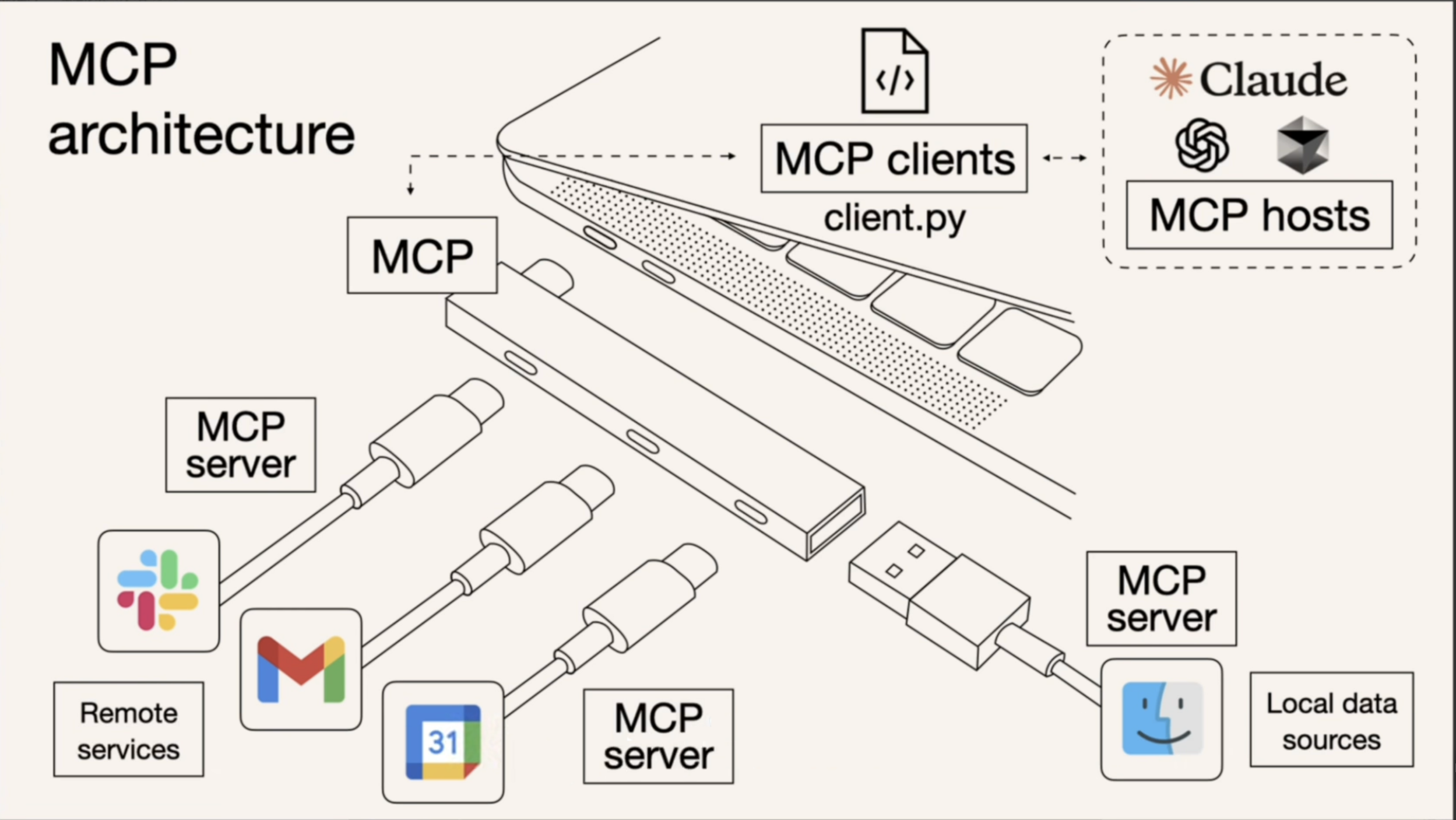
Understanding Agents, MCP, and APIs (Tools) Through a Smart Assistant Analogy
Imagine having a smart personal assistant at home. You simply tell it what you need, and it takes care of everything for you. This is exactly the role of an AI Agent.
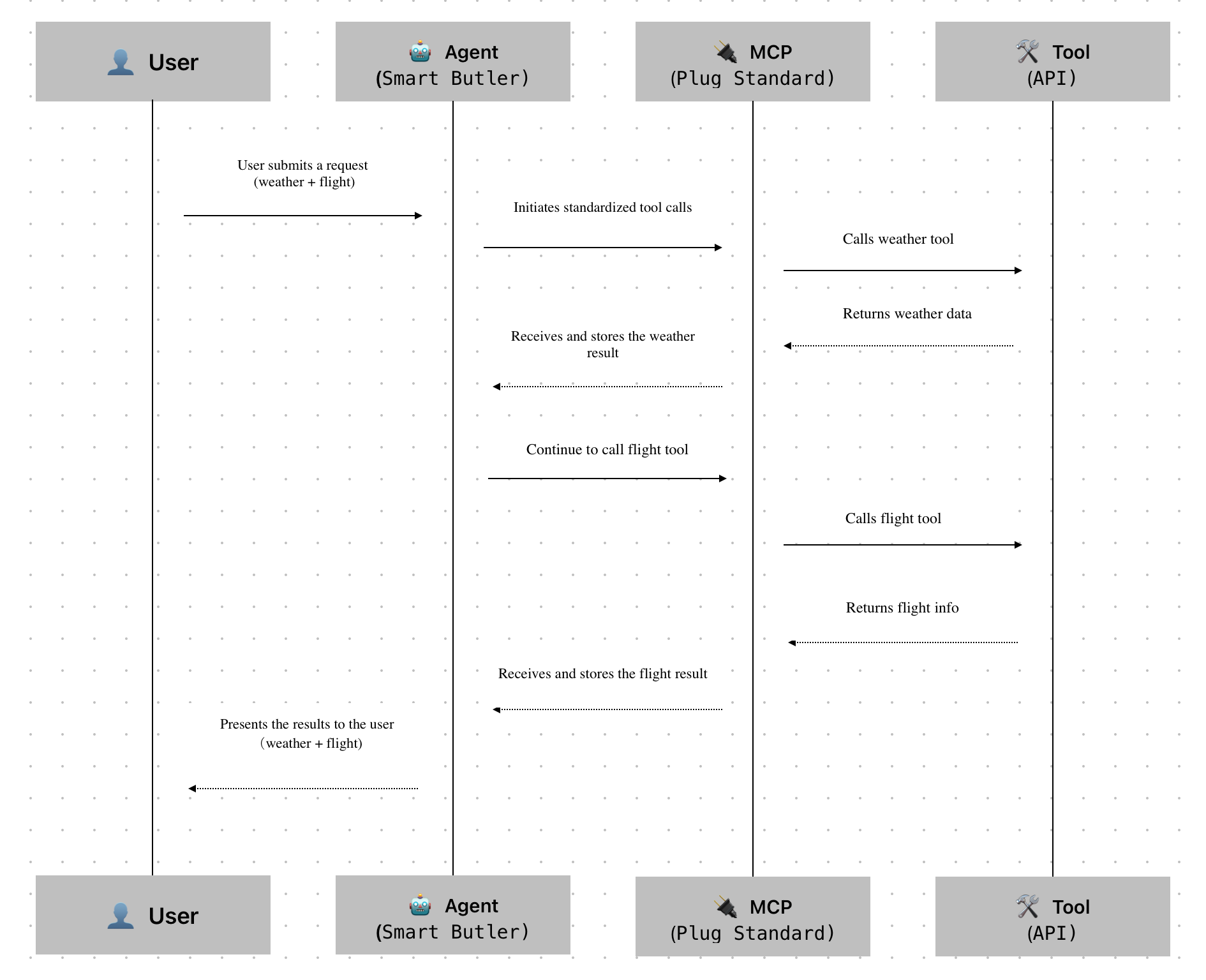
| Role | In the Analogy | Technical Equivalent | Responsibility |
|---|---|---|---|
| 👤 User | The homeowner | End user | Describes the task and waits for the result. |
| 🤖 Agent | A smart personal assistant | AI agent | Understands the user's request, reasons through the task, and orchestrates the appropriate tools. • Responsibility: Determines what needs to be done and in what order. • Capability: Combines multiple tools into a complete workflow. • Think of it as: The brain and decision-making center. |
| 🔌 MCP | A universal power outlet (like USB-C) | Protocol layer | Even the smartest assistant would struggle if every tool had a different interface. MCP standardizes how tools are discovered and invoked, allowing the agent to focus on solving tasks instead of adapting to different integrations. • Standardizes tool invocation • Hides implementation details from the agent • Enables plug-and-play interoperability |
| 🛠️ Tool | Individual tools (Weather, Flights, Email, etc.) | API or service | Tools perform the actual work. • Weather tool → Returns weather information • Flight tool → Retrieves flight options • Email tool → Sends confirmation emails |
Evolution of AI Integrations: API Documentation → Function Calling → MCP
Human Understanding → Model Understanding (Semi-Automated) → Direct Model Execution (Protocol-Based)
| Aspect | API-based Integration | Function Calling | MCP-based Integration |
|---|---|---|---|
| 🧠 Who Interprets It | Human developers | AI model + developer (manual tool registration) | AI model (automatic protocol discovery) |
| 🎯 Primary Interface | Human-readable documentation | Function schema for AI models | Machine-readable protocol definition |
| 🚀 How It Works | Read the API docs → Write requests → Call the API | Define function schemas → AI selects and calls functions | Expose an MCP server → AI automatically discovers and invokes capabilities |
| 🧩 Tool Setup | Configure integrations separately for each platform | Register functions separately on each platform | Configure the MCP server once |
| 🔍 Capability Discovery | Manual documentation lookup | Manual registration | Automatic capability discovery |
| 🔄 Capability Updates | Documentation changes must be synchronized manually | Function definitions must be maintained on every platform | Capabilities are synchronized automatically through the MCP manifest |
| 🧰 Integration Complexity | High — manual implementation and prompt engineering required | Medium — function schemas must be defined | Low — capabilities are exposed automatically through the protocol |
| 🧠 Model Understanding | Prompt-driven, based on documentation | Infers usage from function descriptions | Structured protocol with built-in types for direct understanding |
| 🔒 Invocation Safety | Low — incorrect parameters can easily cause failures | Medium — schemas validate parameter formats | High — protocol-level validation and contextual controls |
| 💬 Analogy | "Read the manual and do it yourself." | "Read the function signature and call it." | "Plug in a USB-C cable and everything just works." |
| ⚙️ Abstraction Layer | Application layer | SDK layer | Protocol layer |
| 🌐 Extensibility | Low — platform-specific integrations | Medium — depends on platform support | High — unified capability discovery across platforms |
| 👩💻 Developer Experience | Human-centric: write and maintain documentation | Semi-automated: register and maintain functions | Fully automated: integrate once, reuse across AI models |
How to Use
APIfox MCP and HAP MCP serve different purposes depending on your integration needs:
- APIfox MCP allows large language models to read and understand the API documentation of HAP applications — ideal for “making the model API-aware.”
- HAP MCP enables direct access and manipulation of application data — designed for “executing business actions through the model.”
| APIfox MCP | HAP MCP | |
|---|---|---|
| Purpose | Enable the model to understand HAP API documentation. | Allow the model to execute HAP application APIs. |
| Access | Documentation: https://apifox.mingdao.com 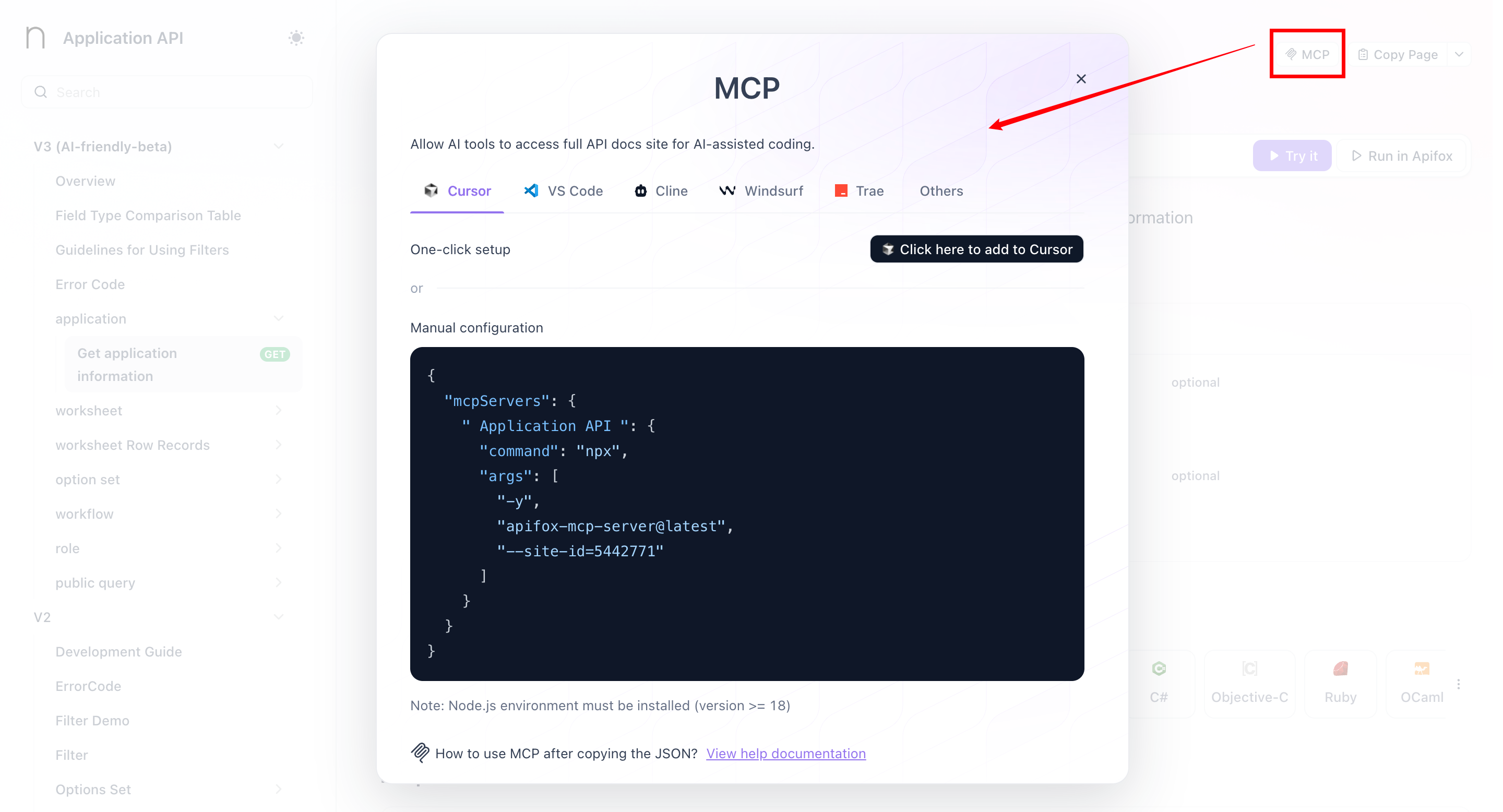 | Accessible from within the Application API Documentation panel. 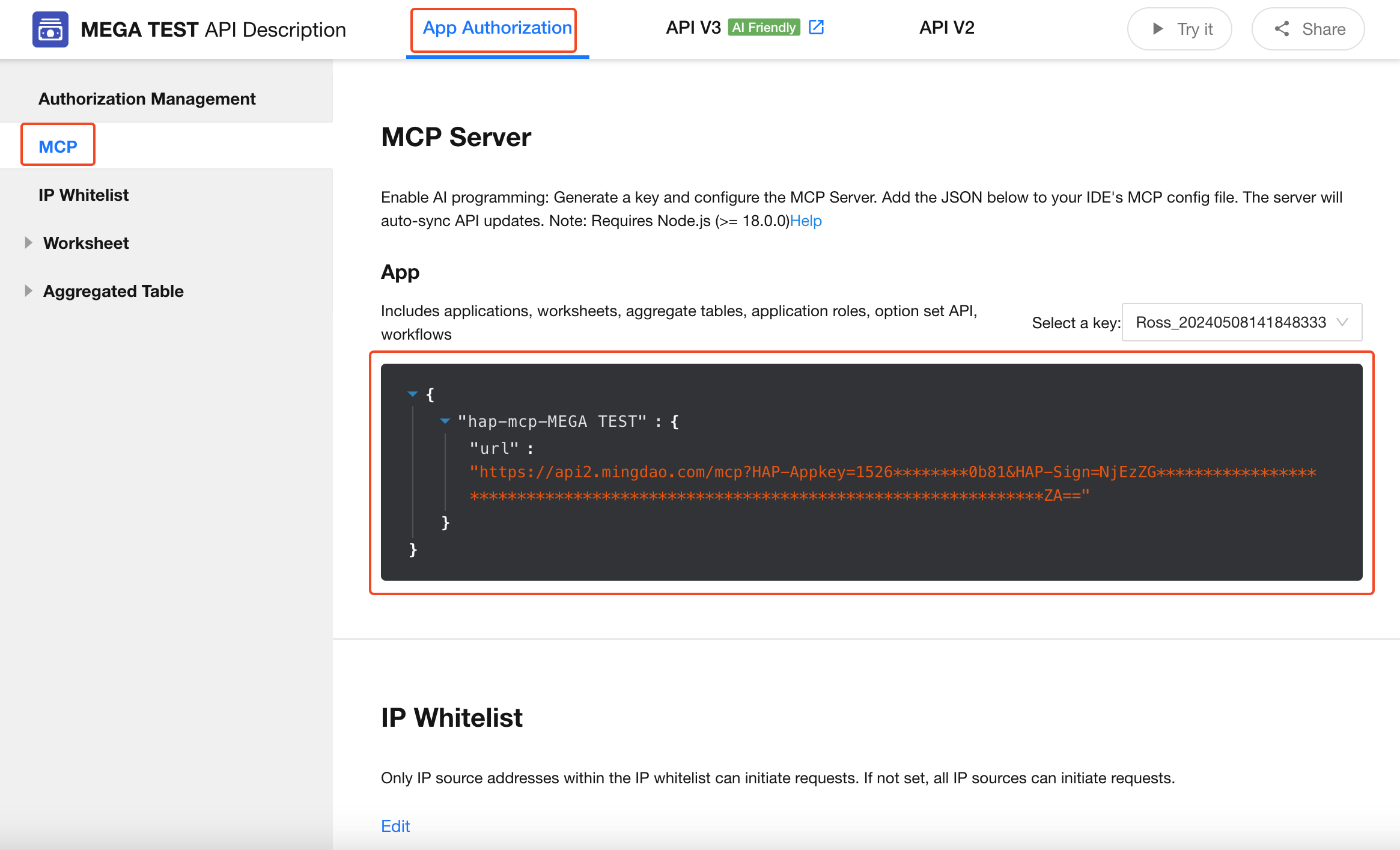 |
| Use Case | When the goal is to understand available API structures for generating API call strategies or orchestrating workflows. 📍Example: For a Customer Case Management application, if you want to create a real-time data dashboard, you can let the model (via a client like Cursor) access the API documentation using APIfox MCP (preferably V3 APIs). | When the goal is to perform actions or access real-time data directly within a production environment. 📍Example: In an orchestration flow, the model may directly retrieve application data, perform analysis, map fields, or update records using HAP MCP. |
| Characteristics | Exposes API definitions, documentation, and examples (read-only). Helps the model act as a knowledgeable API assistant. Best suited for: project development, API discovery, documentation automation. | Exposes executable tools with permission and security control. Helps the model act as a capable operational agent. Best suited for: business execution, production system workflows, governance. |
Configure MCP
Get the HAP MCP Endpoint
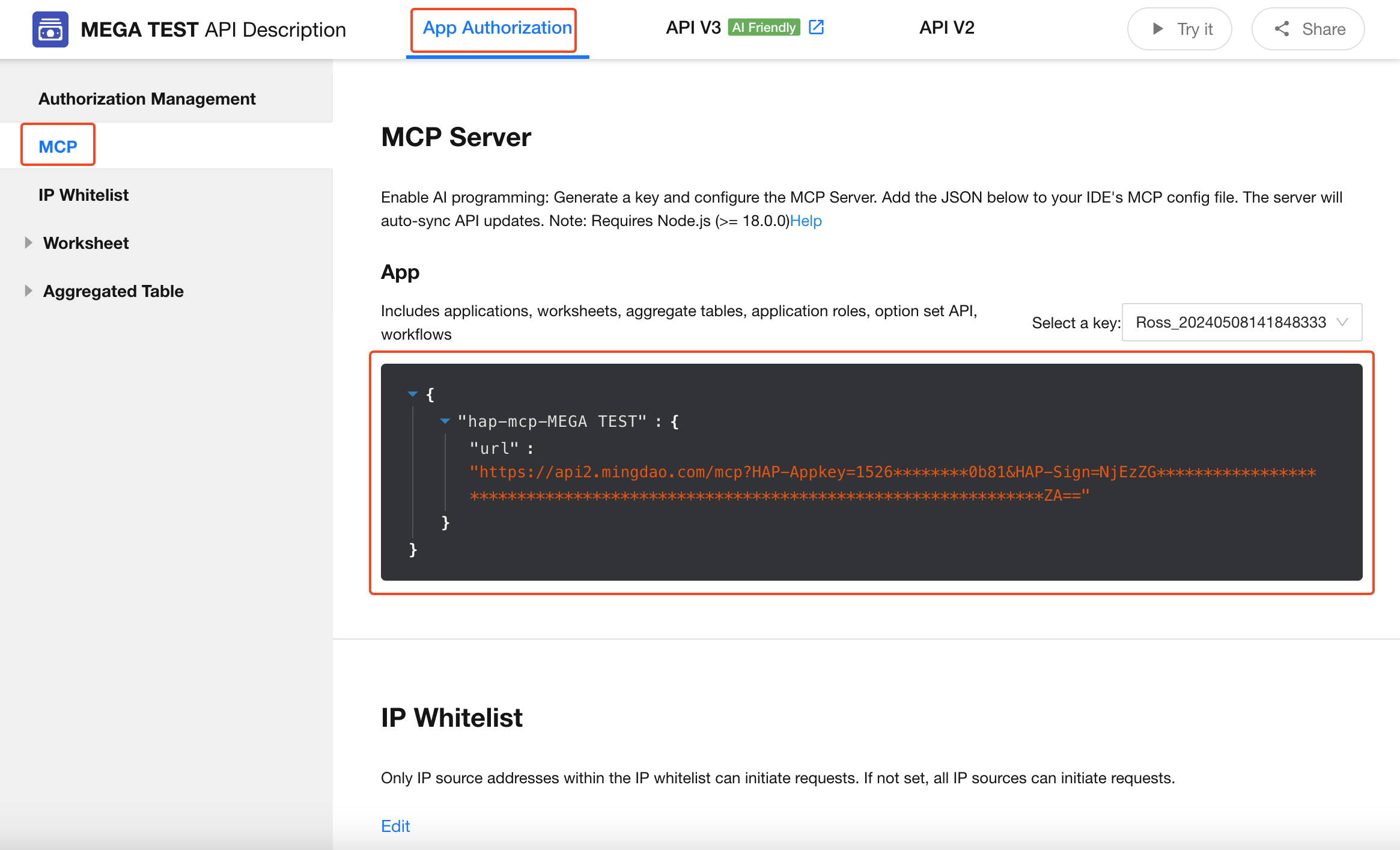
- Open your application's API Documentation.
- Switch to the MCP tab.
- Copy the generated URL, which will be used in the following configuration steps.
Cursor
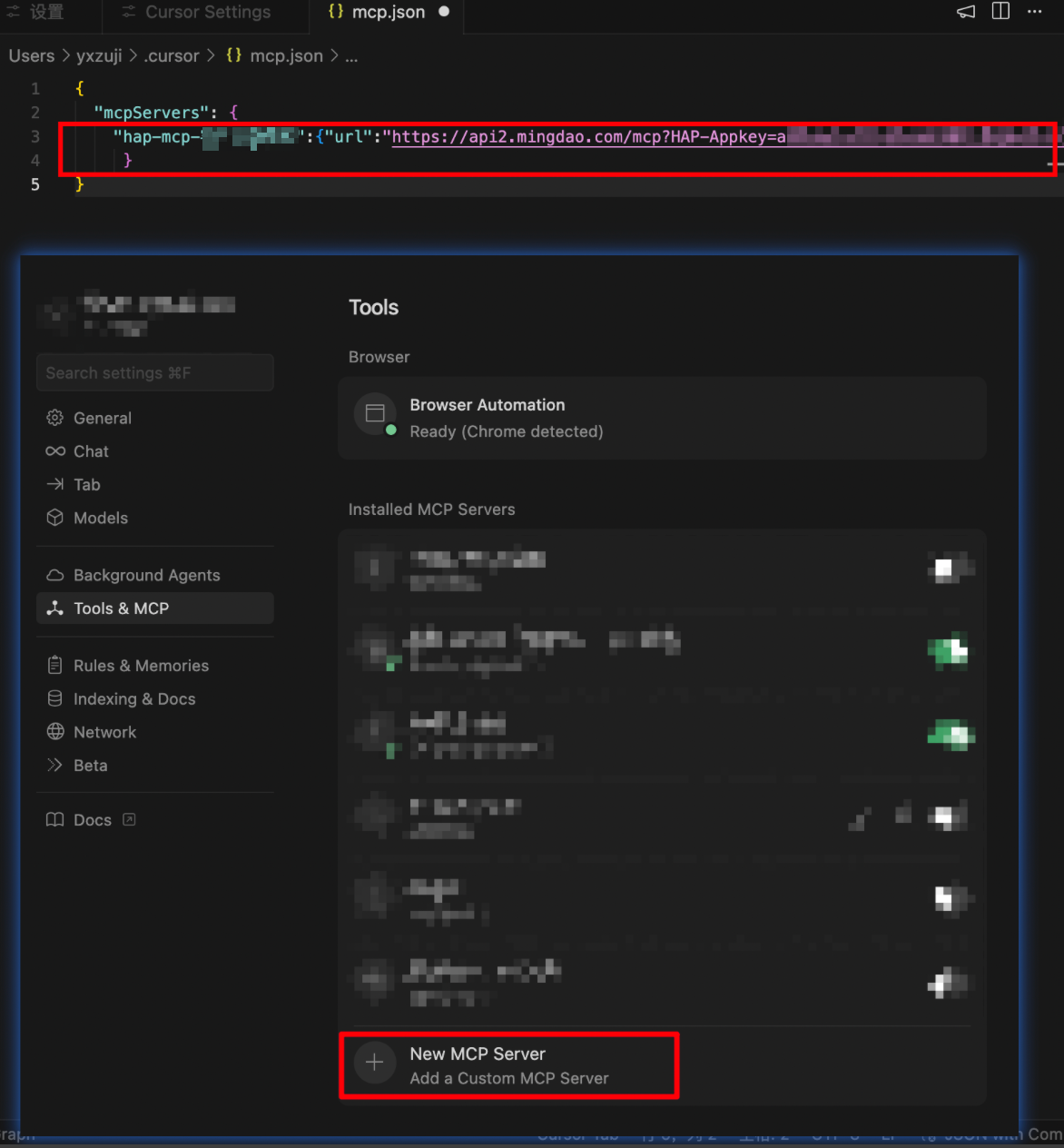
- Open Cursor → Settings → Tools & MCP.
- Click New MCP Server.
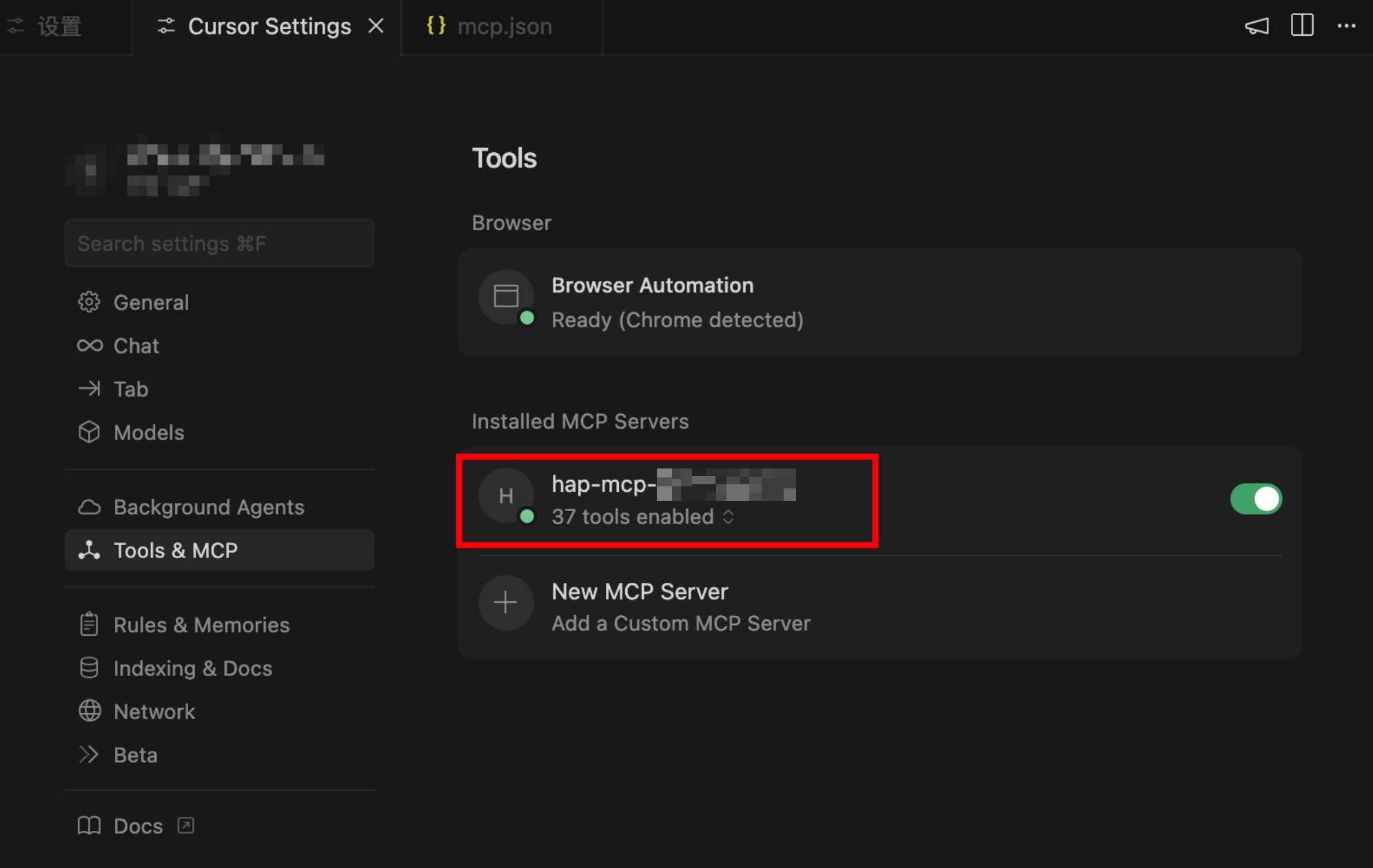
After saving, a green status indicator means the connection has been established successfully.
Dify
Use MCP in an Agent App
- Click Plugins in the upper-right corner.
- Explore Marketplace.
- Search for MCP SSE / StreamableHTTP and install the plugin.
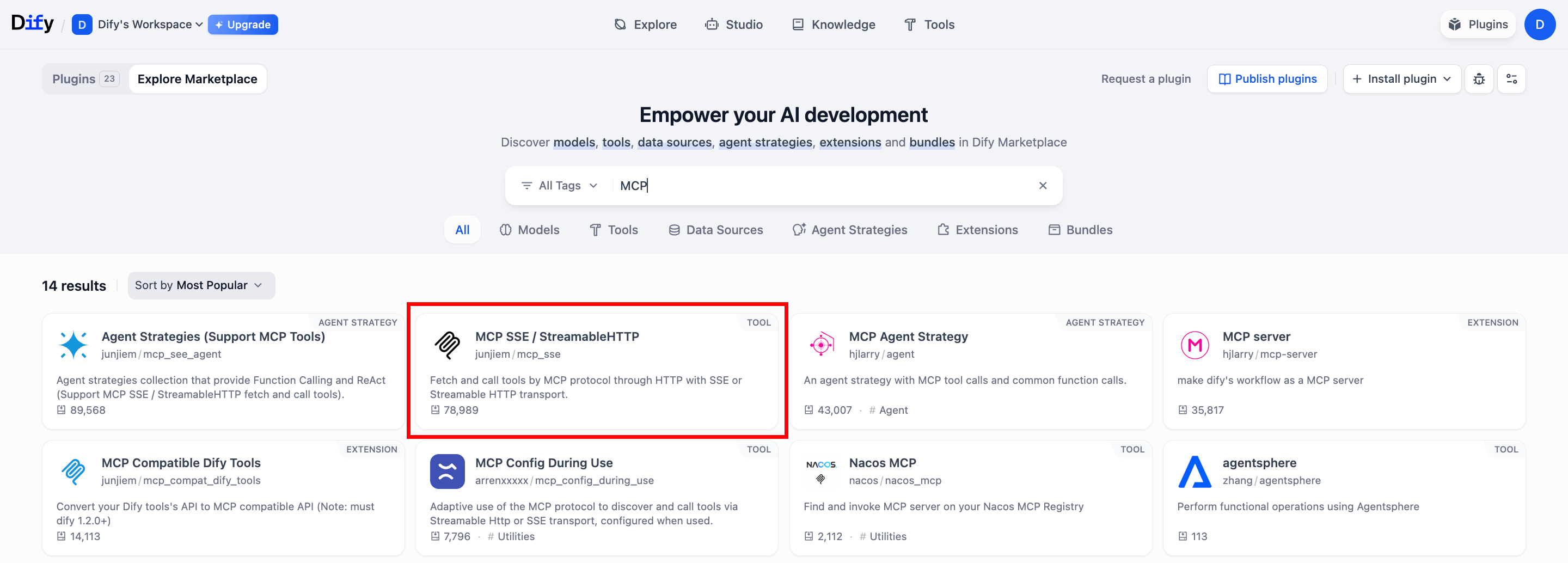
After installation, locate MCP SSE / StreamableHTTP in the installed plugins list.
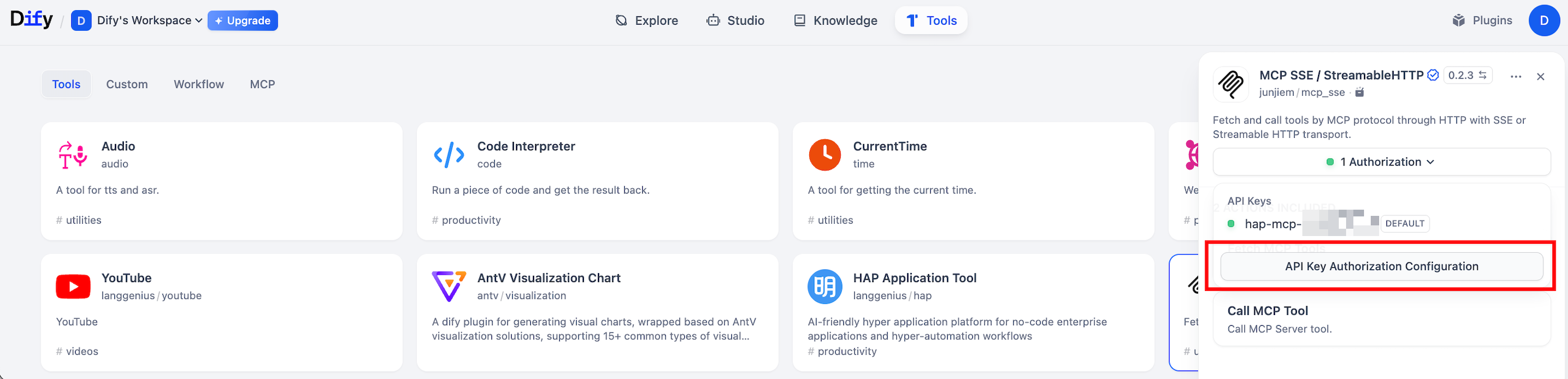
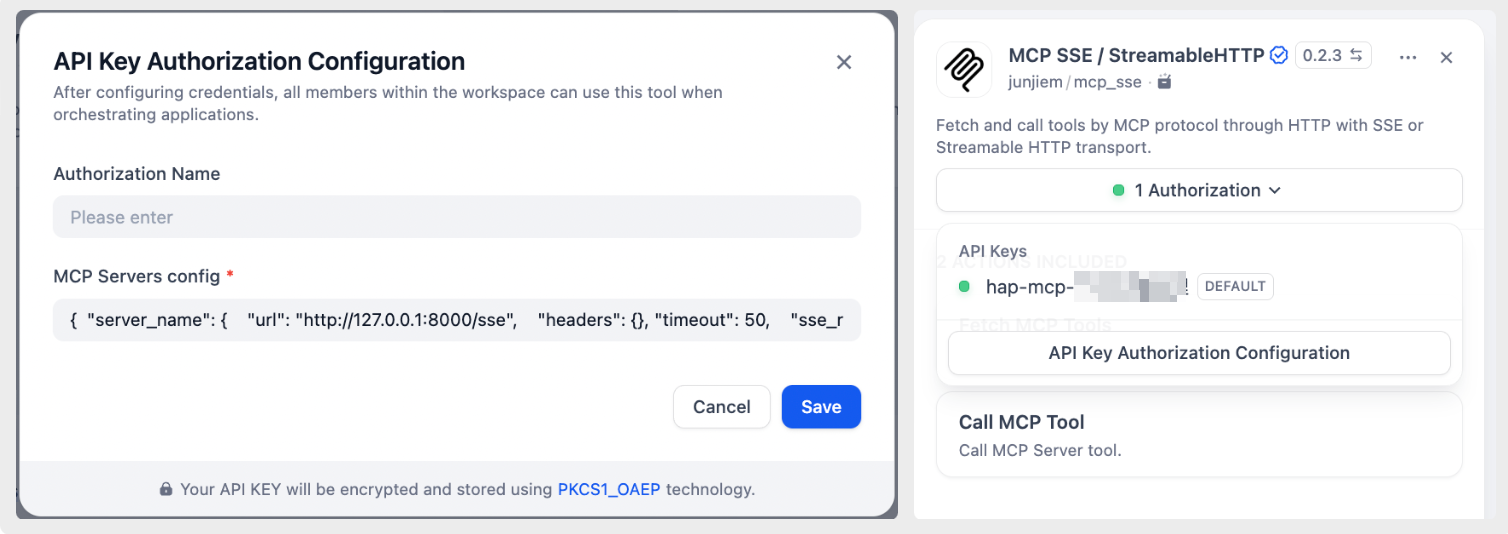
Example configuration
Replace "hap-mcp" with any name you prefer, and replace the URL with the MCP endpoint generated by your HAP application.
{"hap-mcp":{"transport":"streamable_http","url":"<Generated MCP URL>"}}
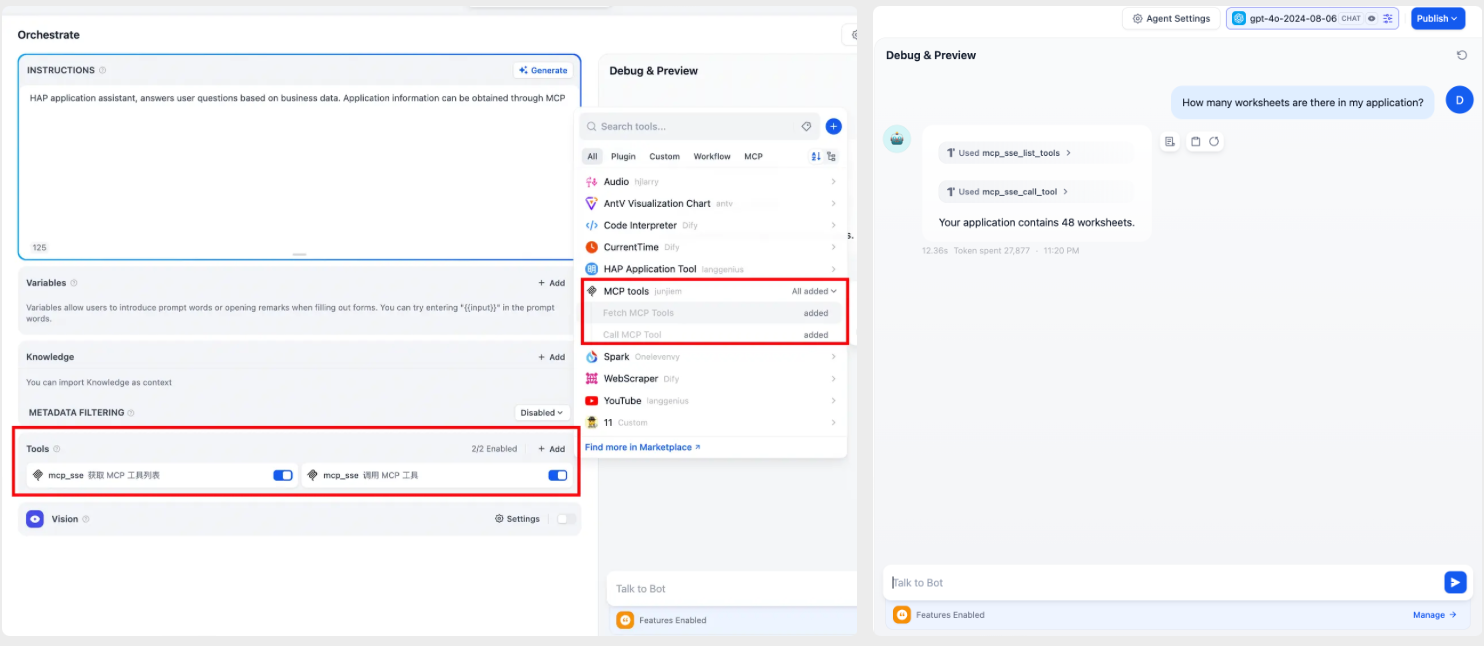
Add the MCP tool and verify that it works as expected.
Use MCP in a Workflow
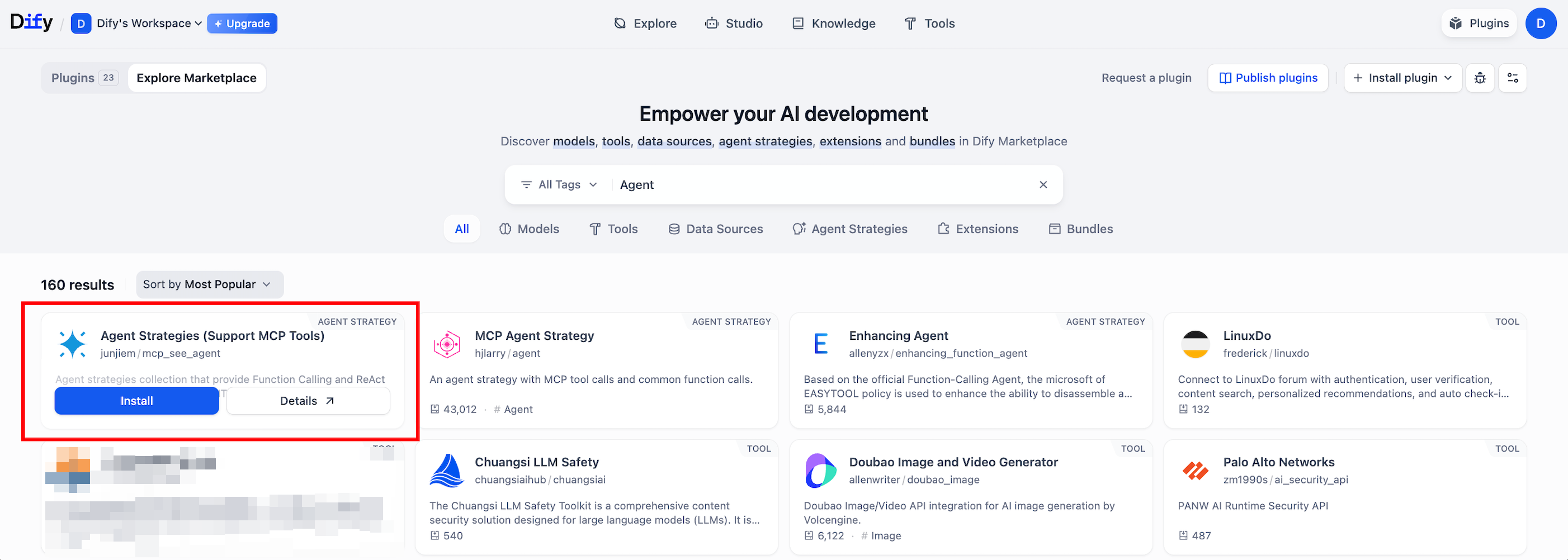
- Click Plugins in the upper-right corner.
- Explore Marketplace.
- Search for Agent Strategies (Support MCP Tools) and install it.
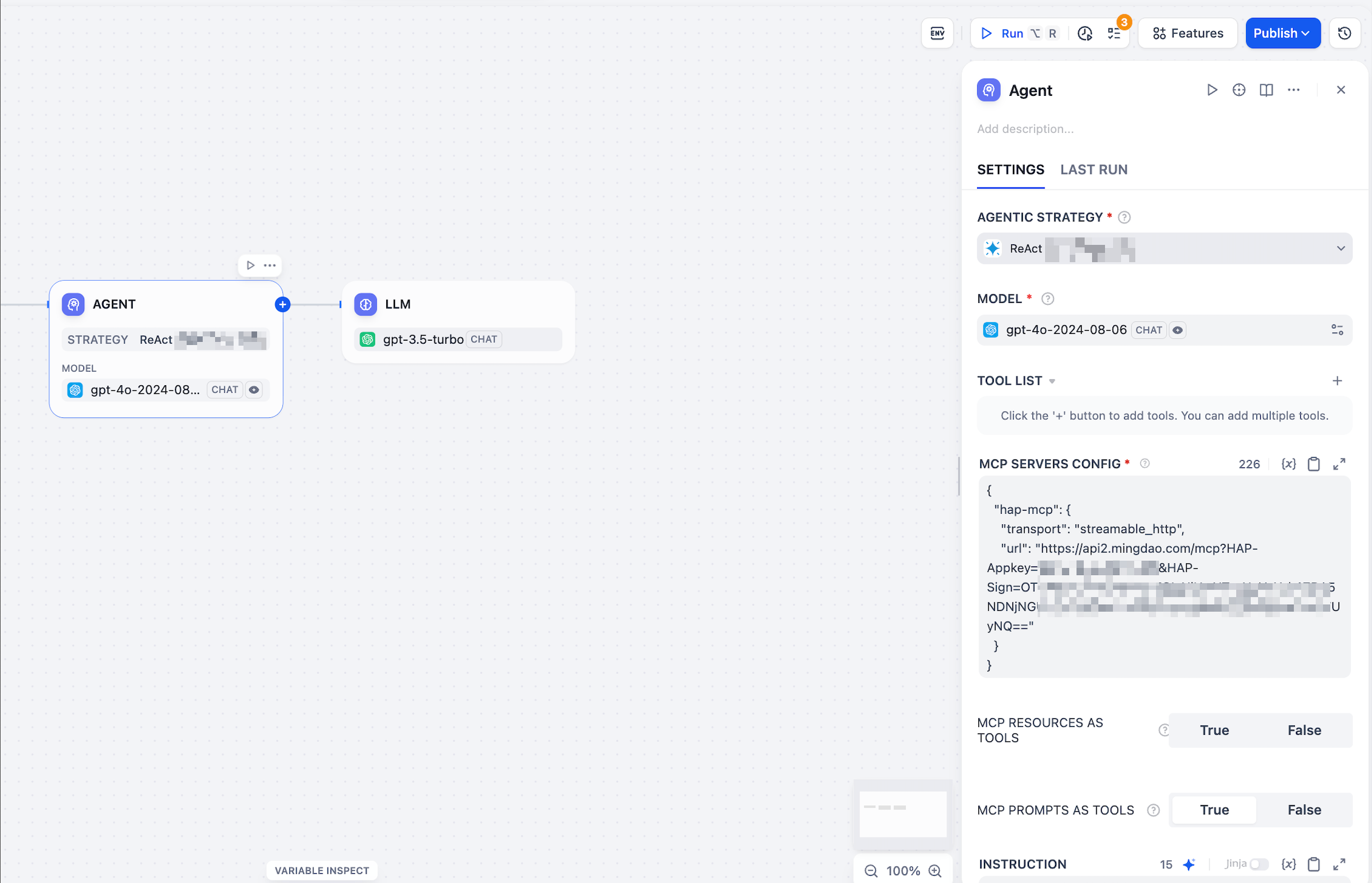
Example configuration
Replace "hap-mcp" with any name you prefer, and replace the URL with the MCP endpoint generated by your HAP application.
{"hap-mcp":{"transport":"streamable_http","url":"<Generated MCP URL>"}}
VS Code + Cline
-
Install the Cline Extension
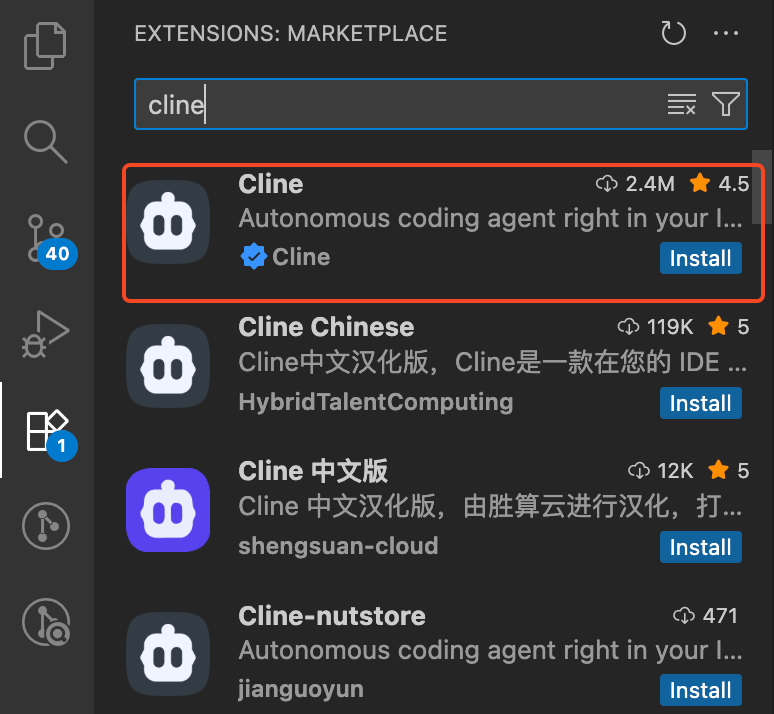
-
Click MCP Server to configure the MCP server
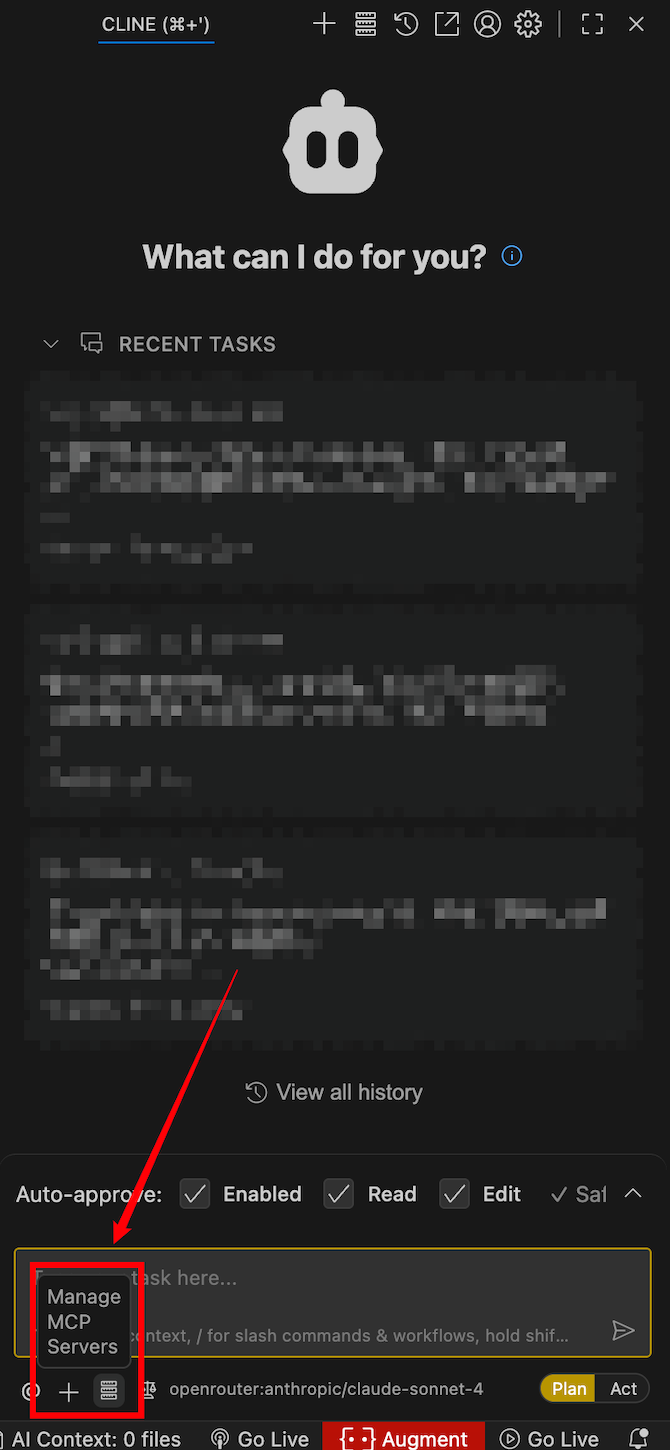
Example configuration
"hap-mcp": {
  "url": "<Generated MCP URL>",
  "type": "streamableHttp",
  "disabled": false,
  "autoApprove": []
}
Was this document helpful?